introAndSelectors
CSS Intro & CSS Selectors#
What is CSS?
Cascading Style Sheets (CSS) is defines how HTML elements are to be displayed. It's manage the layouts, colors and fonts of your website elements.
This style sheet language also allows you to add effects or animations to your website. You can use it to display some CSS animations like click button effects, spinners or loaders, and animated backgrounds.
CSS Syntax:
What is a rule or "rule set"?#
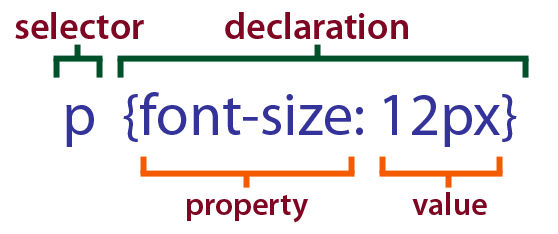
A rule or "rule set" is a statement that tells browsers how to render particular elements on an HTML page. A rule set consists of a selector followed by a declaration block.
The property with the value called a declaration OR Rule structure:
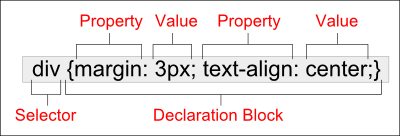
All declarations for the same selector called declaration block.
CSS Selectors:
part of the CSS Syntax, that use to select the element which you need to apply the style on it.
We have a lot of CSS selector but in this workshop we will talk about the basic CSS selectors.
Basic CSS Selectors:#
- Tag
- Id
- Class
- Universal selector
Tag: selects the elements which has the same tag name, for example:
In this example: this style will be applied to all the p elements in your page.

- #id: selects the elements which have the same id name, for example:
In this example: this style will be applied to the element which has id id
- .class: selects the elements which have the same class name, for example:
In this example: this style will be applied to all the elements which have the class-1 class in your page.
- *: This selector called 'universal' and use to select all the elements in the page, for example:
In this example: this style will be applied to all the elements in your page.
Descendant Selector:
sometimes you need to access selectors that be inside other selectors(not single selectors as the previous examples), in this cases you need to use the Descendant Selector, you can use it by adding a space between the selectors, for example:
In this example: this style will be applied on all p elements which be inside a section element (direct child and not direct child).
HTML Example for the direct child and not direct child:
Grouping Selectors: you can add the same style for many selectors, you just need to separate between them with commas, for example: